
xr/studio Documentation
Core Concepts
Learn the key building blocks of xr/studio: workspaces, stories, scenes, Asset Manager, entities, and the inspector.
Workspace
Your first workspace is created automatically when you register. A Workspace groups your stories and assets. Teammates share everything inside a workspace. You control access with roles: Owners can manage billing and members, Editors can create and edit stories, Viewers can only preview.
Note: While you are inside a story in the editor, use Back (←) to return to the dashboard first; workspace management lives on the dashboard header, not in the editor toolbar.
Story (Experience)
A Story is your complete XR experience. It has a title, settings, one or more scenes, entities, prefabs, assets and lives in web.
How everything connects
Workspace → Stories → Scenes → Entities / Assets
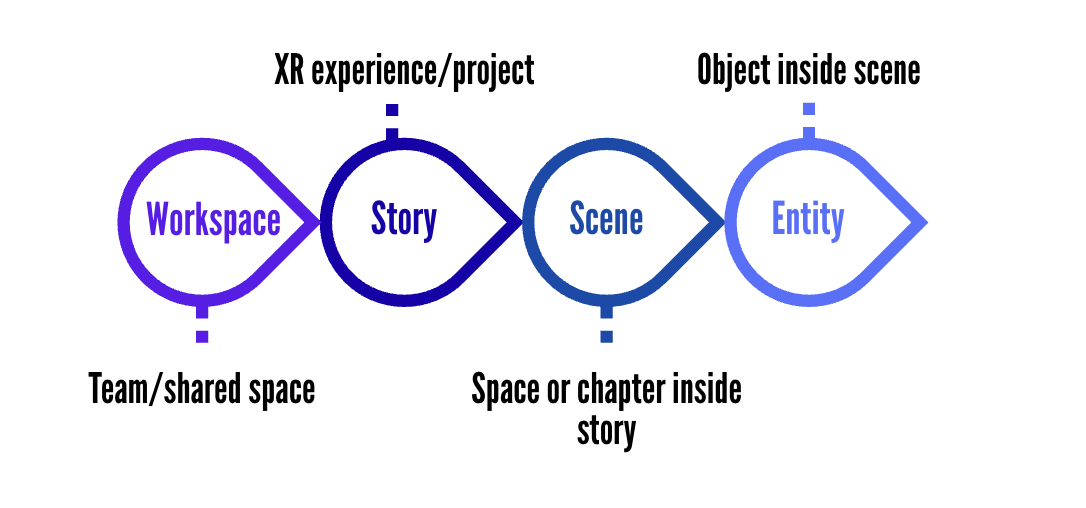
- A Workspace contains your stories, teammates, roles, settings, subscriptions, prefabs, assets and much more
- A Story belongs to one workspace. It stores your draft version, published version, settings, scenes, assets, and optional store connection.
- A Scene belongs to a story. It contains entities, scene-level actions, timeline settings, physics, visibility rules, camera controls, and player controls.
- An Entity belongs to a scene. Entities can be nested inside each other, animated, tagged, made interactive, or connected to assets.
- An Asset can be reused across stories and scenes. Inside a story, assets also track which scenes and entities use them so Studio knows what to load and publish.
Scene
A Scene is one "space" inside your story. Think chapters in a book. A scene can be a 3D environment, a 360° panorama, a map, a webcam feed, a livestream, etc. Each type has different capabilities.
Scenes play in order by default, or you can let users jump between them using actions.
Asset Manager
The Asset Manager is where all your uploaded files live: images, videos, 3D models, audio, fonts, and more. Upload once, use in any story inside the same workspace.
Studio automatically converts uploaded files into web-optimised formats: video becomes HLS + WebM, 3D models get Draco compression, Gaussian splats become SOG format. You never deal with the raw processing yourself.
Entities
Everything you place in a scene is an Entity. There are 50+ entity types: images, videos, 3D models, lights, cameras, GUI panels, audio sources, and more. Entities live in a hierarchy, so you can parent them to each other for grouped movement.
Entities can also have actions, tags, physics, visibility rules, and timeline animations. Actions can target one entity directly or target many entities by tag, which is useful for showing, hiding, animating, or navigating as a group.
Prefabs
A Prefab is a reusable group of entities stored in your workspace. Use prefabs for repeated structures like product cards, hotspot groups, branded UI panels, or room setups.
When you place a prefab into a story, Studio creates real entities in the scene. Local edits stay on that instance, so you can adjust one copy without breaking the original prefab.
Published Story
When your story is ready, click Publish. Studio generates a shareable URL. Every publish updates that same URL, so viewers who already have the link always see your latest version. You control who can access it: public, password-protected, or team-only.